If you surf Facebook on daily basis or occasionally, chances are you’re already familiar with regular stuffs like add/delete friends, update statuses, walls and profile, add and explore pages & applications, etc, but there’s more..
This week we want to cover some interesting things you can do on (or with) Facebook; inclusive of tricks that are not documented or unknown to many, as well as tips to stay connected better with your friends. Without further ado, here’s 20 Facebook Tips/Tricks You Might Not Know. If you have interesting tips/tricks related to Facebook, please feel free to share in the comment box below.
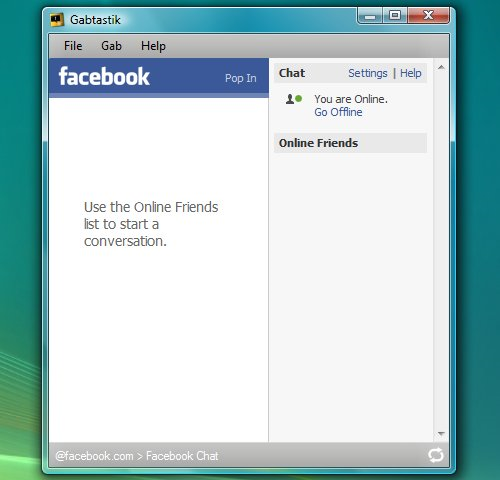
1. How to Access Facebook Chat on Desktop
Gabtastik and digsby let you keep Facebook chat sessions open on your Windows desktop outside of your regular web browser, using minimal screen real estate and system memory.

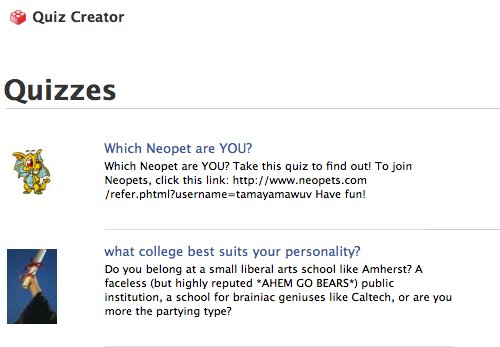
2. How to Create Quiz on Facebook Easily
LOLapps provides quiz creator that can be employed to conjure up these popular personality quizzes that are so widespread in Facebook.

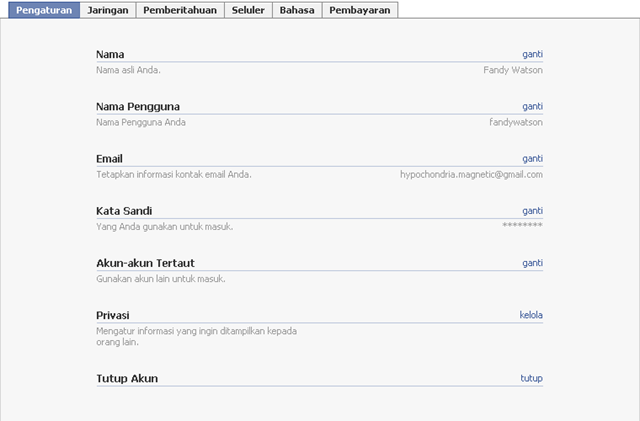
3. How to Delete, Cancel and Terminate Facebook Account and Profile
Facebook is a popular social networking website comparable to MySpace. You may receive many invite requests from friends, coursemates, colleagues or family members to join Facebook to connect with them. So you join and sign up a Facebook account but think that may be a phone call is a much better way to bring relationship with friends closer or Facebook account has seriously invaded your privacy and security, you can easily terminate, delete or cancel Facebook account, together with the Facebook profile.
- Sign in to Facebook account.
- Click on Account link on the top right corner.
![image_thumb1[5]](//lh5.ggpht.com/_PJCld6hzVtg/Ss8X8Ti8zXI/AAAAAAAAAZ0/q_HP1mN94So/image_thumb153.png?imgmax=800 "image_thumb1[5]")
3. On the “Settings” tab (click on Settings if you’re not already there), click on deactivate at the end of “Deactivate Account” line.

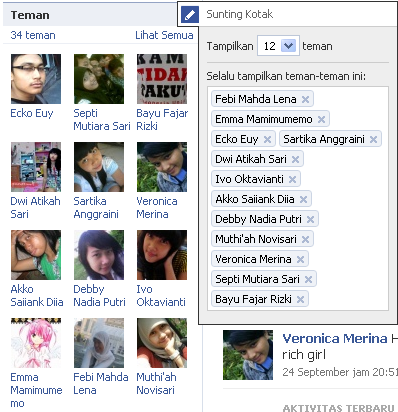
4. How to Display Selected Pictures Only on your Facebook Profile Page
A little-known feature in Facebook that lets you decide who shows up in that Friends box. Click that "edit" pencil in your Friends box and type the names of your best friends in the box that says "Always show these friends".

5. How to Download Facebook Photo Albums
FacePAD: Facebook Photo Album Downloader allows you to download your friends’ facebook albums, Events albums, and Group Albums, en masse, with the click of a button.
![image_thumb2[5]](//lh5.ggpht.com/_PJCld6hzVtg/Ss8YYSewkjI/AAAAAAAAAaM/O5Wtxsiazwg/image_thumb253.png?imgmax=800 "image_thumb2[5]")
6. How to Get Facebook on Your Desktop
Seesmic Desktop, Facebooker, Xobni, Facebook Sidebar Gadget, Scrapboy and Facebook AIR application are desktop applications that allows you interact with your stream just as you would on Facebook, but without the browser.

7. How to Get Facebook Updates on Email
NutshellMail consolidates your Facebook accounts through the inbox you use the most.
![image_thumb2[7]](//lh3.ggpht.com/_PJCld6hzVtg/Ss8Yj0WcbcI/AAAAAAAAAaU/moPb-haTnlI/image_thumb273.png?imgmax=800 "image_thumb2[7]")
8. How to Know When Facebook Friends Secretly Delete or Block You
X-Friends is a unique tool for tracking friends that disappear from Facebook.
![image_thumb1[7]](//lh5.ggpht.com/_PJCld6hzVtg/Ss8Yp3HOrsI/AAAAAAAAAac/stT4BPAPptg/image_thumb173.png?imgmax=800 "image_thumb1[7]")
9. How to Place Facebook Chat On Firefox Sidebar

Facebook Chat is cool, at least it allows you to send instant messages to online Facebook contacts. However I’m not really a fan of the chat bar being at the bottom of the page, what if I’ve left Facebook but still wants to remain chatting with my Facebook contacts? If you are using Firefox, you can place the Facebook Chat at the sidebar.
Step 1
Look for Bookmarks on the top navigation. Select Organize Bookmarks…
![image_thumb[3]](//lh6.ggpht.com/_PJCld6hzVtg/Ss8Y5v8kFPI/AAAAAAAAAas/xKek7m3qoHg/image_thumb32.png?imgmax=800 "image_thumb[3]")
Step 2
Click New Bookmark... tab and enter the following:
- Name: Facebook Chat
- Location: http://www.facebook.com/presence/popout.php
- Check Load this bookmark in sidebar.
![image_thumb2[9]](//lh4.ggpht.com/_PJCld6hzVtg/Ss8Y_JZg83I/AAAAAAAAAa0/sI9OCpacYYY/image_thumb292.png?imgmax=800 "image_thumb2[9]")
Step 3
Launch the Firefox sidebar, click Facebook Chat and start chatting with your Facebook contacts within Firefox.
![image_thumb3[5]](//lh4.ggpht.com/_PJCld6hzVtg/Ss8ZDXivtzI/AAAAAAAAAa8/V41aYcJ0sug/image_thumb352.png?imgmax=800 "image_thumb3[5]")
10. How to Post Your Blog Posts to Your Facebook Wall Automatically
Wordbook allows you to cross-post your blog posts to your Facebook Wall. Your Facebook “Boxes” tab will show your most recent blog posts.
![image_thumb2[11]](//lh6.ggpht.com/_PJCld6hzVtg/Ss8ZMiY4ANI/AAAAAAAAAbE/LryhpGCZAiM/image_thumb2113.png?imgmax=800 "image_thumb2[11]")
11. How to Remove Facebook Advertisements
This Greasemonkey script – Facebook: Cleaner removes many of the annoying ads and updates that unavoidably appear on your Facebook pages.

12. How to Schedule Facebook Messages
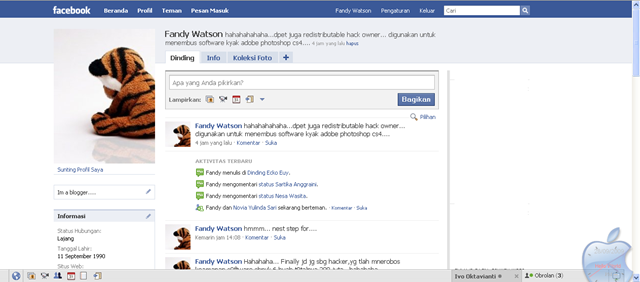
Sendible lets you schedule Facebook messages ahead of time so you can send messages to your friends, customers or colleagues in the future.
![image_thumb2[13]](//lh6.ggpht.com/_PJCld6hzVtg/Ss__I2eHetI/AAAAAAAAAdI/MCP2jFlzfqU/image_thumb2133.png?imgmax=800 "image_thumb2[13]")
13. How to Share Flickr Photos to Facebook
Flickr2Facebook is an unofficial Flickr to Facebook uploader(bookmarklet) which allows you upload photos to Facebook from Flickr.
![image_thumb2[15]](//lh4.ggpht.com/_PJCld6hzVtg/Ss__SRkjAJI/AAAAAAAAAdQ/NZWiHeHOoN8/image_thumb2153.png?imgmax=800 "image_thumb2[15]")
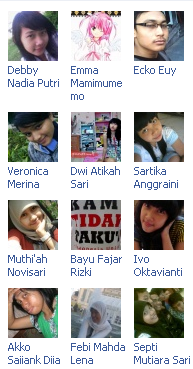
14. Create Photo Collage/Grid-View Of Your Facebook Friends

Here’s a small little trick in Facebook that allows you to create a grid view or photo collage out of your friends list. This is how I do it:
- Click on Friends tab.
- Proceed to More tab.
- From "Choose an option" dropdown, choose any of the dashes "—"
![image_thumb1[9]](//lh6.ggpht.com/_PJCld6hzVtg/Ss__dX1JhOI/AAAAAAAAAdg/qUDK0bexVe4/image_thumb193.png?imgmax=800 "image_thumb1[9]")
Photos of all your friends will be displayed, each in 50×50 pixels forming a grid view. Have fun.
15. How to “Friend” Someone on Facebook & Hide It From Your Status Updates
I’m sure that this has happened to you before. Someone you have ties to, whether it’s a co-worker, your boss, or even worse, a parent, has finally discovered social networking and wants to be your newest Facebook friend.
For me personally, that’s no big deal. I’m fairly open about my online activities. Everything I write, Digg, or otherwise share goes through my FriendFeed to my Twitter then ultimately onto my Facebook (my, that sounds naughty). Besides that, just about everyone I’d consider a co-worker is already on Facebook, and would have little issue about my other Internet activities.
On your Facebook home page, you should see the ‘Settings’ menu close to the search field on your upper-right. Open that menu and go to ‘Privacy Settings’.
![image_thumb2[17]](//lh4.ggpht.com/_PJCld6hzVtg/Ss__nAIs0kI/AAAAAAAAAdo/NVLZN7wal6w/image_thumb2173.png?imgmax=800 "image_thumb2[17]")
On the next page, you’ll have four choices: Profile, Search, News Feed, and Applications. What you’ll want to edit here are your Profile privacy settings.
![image_thumb6[5]](//lh3.ggpht.com/_PJCld6hzVtg/Ss__0tC5bEI/AAAAAAAAAdw/rCf4txk0cTk/image_thumb653.png?imgmax=800 "image_thumb6[5]")
By default, everything on your profile is limited to your Friends and your Networks (your first Network is likely your city of residence, but you may have joined more). From the screenshot above, you can see that I’ve limited everything on my profile to my Friends and their Friends. Anyone else who visits my profile will only see that I have a profile, but will not see what’s on it.
In my example, you’re going to want to edit the setting on your Status Updates, since you don’t want your boss to know that you’ve “fanned” the competition. Click that dropdown menu and then select ‘Customize’.

You may want to tweak your overall privacy setting here, but what we’re aiming for is the “Except These People” list at the bottom of this dialog. Type out the name of any of your Friends to restrict that person from viewing anything in your Status Updates.
For all you faithful Facebook fans, we’ve got a lot of tips and tricks on how to make the most of the site. If you have any privacy tips or concerns to share, please drop them in a comment.
16. How to Hide Your Online Status on Facebook Chat from Select Contacts
Facebook has integrated friends list with Chat and you can also choose which of these list members get to see you online.
![image_thumb2[19]](//lh5.ggpht.com/_PJCld6hzVtg/StAANlkqkXI/AAAAAAAAAeA/UlCxBB1d3-A/image_thumb2193.png?imgmax=800 "image_thumb2[19]")
![image_thumb3[7]](//lh5.ggpht.com/_PJCld6hzVtg/StAAWgMaCGI/AAAAAAAAAeI/sSlQyEAlXCM/image_thumb372.png?imgmax=800 "image_thumb3[7]")
17. How to Syncs Photos of Facebook Friends with Contacts in Microsoft Outlook
OutSync is a free Windows application that syncs photos of your Facebook friends with matching contacts in Microsoft Outlook. It allows you to select which contacts are updated. So you can update all contacts at once or just a few at a time.
![image_thumb3[9]](//lh3.ggpht.com/_PJCld6hzVtg/StAAyyB7ARI/AAAAAAAAAeQ/7d-aKfhKCJ4/image_thumb393.png?imgmax=800 "image_thumb3[9]")
18. How to Update Facebook Status from Firefox
FireStatus is a status update utility for multiple social networks, including FaceBook.
![image_thumb2[21]](//lh4.ggpht.com/_PJCld6hzVtg/StAA8ST22AI/AAAAAAAAAeY/X3P5hKP5JZE/image_thumb2213.png?imgmax=800 "image_thumb2[21]")
19. How to Update Facebook without Using Facebook
hellotxt and Ping.fm both introduced features that let Facebook administrators update Facebook Pages.
![image_thumb2[23]](//lh6.ggpht.com/_PJCld6hzVtg/StABaCylsZI/AAAAAAAAAeg/YwVci4ETl0A/image_thumb2233.png?imgmax=800 "image_thumb2[23]")


![image_thumb1[5]](http://lh6.ggpht.com/_PJCld6hzVtg/Ss8X3lQ4KLI/AAAAAAAAAZw/5qt1RzGNU1U/image31.png?imgmax=800 "image_thumb1[5]")
![image_thumb2[5]](http://lh4.ggpht.com/_PJCld6hzVtg/Ss8YSVf7zUI/AAAAAAAAAaI/4GF_1sEQ01Y/image41.png?imgmax=800 "image_thumb2[5]")
![image_thumb2[7]](http://lh3.ggpht.com/_PJCld6hzVtg/Ss8Yfxr86pI/AAAAAAAAAaQ/aYo11b_QsLo/image6.png?imgmax=800 "image_thumb2[7]")
![image_thumb1[7]](http://lh3.ggpht.com/_PJCld6hzVtg/Ss8YnRxKb9I/AAAAAAAAAaY/9I9dpUshWmg/image32.png?imgmax=800 "image_thumb1[7]")

![image_thumb[3]](http://lh6.ggpht.com/_PJCld6hzVtg/Ss8Y4MjuWdI/AAAAAAAAAao/2q-AkhnlJEk/image2.png?imgmax=800 "image_thumb[3]")
![image_thumb2[9]](http://lh3.ggpht.com/_PJCld6hzVtg/Ss8Y7fzCZXI/AAAAAAAAAaw/D8F7DxCDz_E/image61.png?imgmax=800 "image_thumb2[9]")
![image_thumb3[5]](http://lh4.ggpht.com/_PJCld6hzVtg/Ss8ZBFoMPiI/AAAAAAAAAa4/YwIN4503wUU/image9.png?imgmax=800 "image_thumb3[5]")
![image_thumb2[11]](http://lh5.ggpht.com/_PJCld6hzVtg/Ss8ZJI19o9I/AAAAAAAAAbA/ubByoInItkQ/image62.png?imgmax=800 "image_thumb2[11]")
![image_thumb2[13]](http://lh5.ggpht.com/_PJCld6hzVtg/Ss8Zac9ITsI/AAAAAAAAAbQ/_GBD41BVVgo/image42.png?imgmax=800 "image_thumb2[13]")
![image_thumb2[15]](http://lh3.ggpht.com/_PJCld6hzVtg/Ss__N6Ts-4I/AAAAAAAAAdM/j_jA7eViQbM/image43.png?imgmax=800 "image_thumb2[15]")
![image_thumb1[9]](http://lh4.ggpht.com/_PJCld6hzVtg/Ss__bEvYYOI/AAAAAAAAAdc/E3qoxAY9-GM/image33.png?imgmax=800 "image_thumb1[9]")
![image_thumb2[17]](http://lh5.ggpht.com/_PJCld6hzVtg/Ss__jqKvzUI/AAAAAAAAAdk/5MmJW1ZjqLA/image64.png?imgmax=800 "image_thumb2[17]")
![image_thumb6[5]](http://lh4.ggpht.com/_PJCld6hzVtg/Ss__sb7Po2I/AAAAAAAAAds/WdLHGB6W0TI/image12.png?imgmax=800 "image_thumb6[5]")

![image_thumb2[19]](http://lh4.ggpht.com/_PJCld6hzVtg/StAAI_S0jSI/AAAAAAAAAd8/jqIEA0j7zZ0/image65.png?imgmax=800 "image_thumb2[19]")
![image_thumb3[7]](http://lh6.ggpht.com/_PJCld6hzVtg/StAATC419iI/AAAAAAAAAeE/0xgNo3D-XeY/image91.png?imgmax=800 "image_thumb3[7]")
![image_thumb3[9]](http://lh6.ggpht.com/_PJCld6hzVtg/StAAh1rOkHI/AAAAAAAAAeM/OfF7jnPRH5U/image51.png?imgmax=800 "image_thumb3[9]")
![image_thumb2[21]](http://lh6.ggpht.com/_PJCld6hzVtg/StAA3exgksI/AAAAAAAAAeU/H_Ys722mlwE/image44.png?imgmax=800 "image_thumb2[21]")
![image_thumb2[23]](http://lh3.ggpht.com/_PJCld6hzVtg/StABEr3QboI/AAAAAAAAAec/yrmvFc0HwPU/image45.png?imgmax=800 "image_thumb2[23]")
Join The Community